









Neo VPN
V2ray Configs - Easy to use in only 4 Steps...

Step 1. Download Client application to use Neo VPN
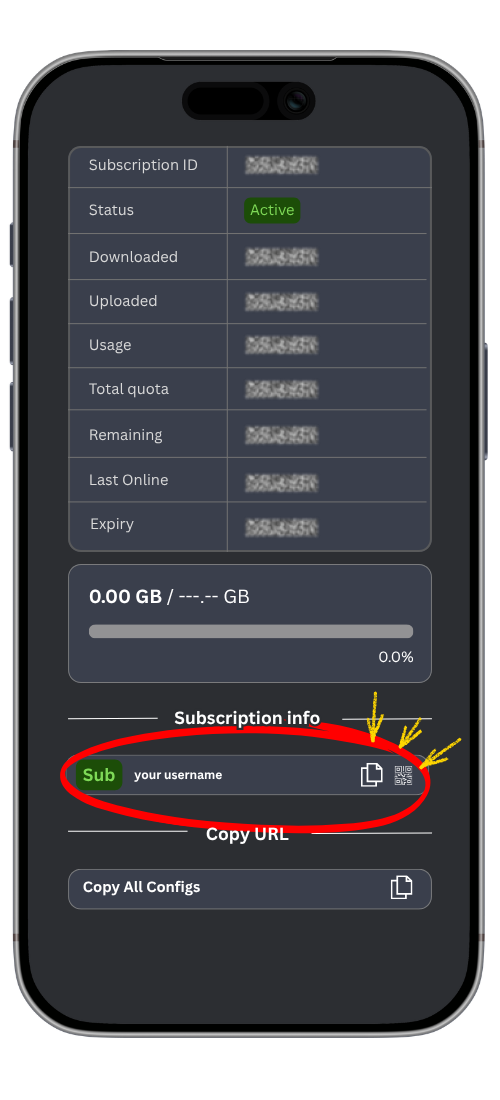
Step 2. Open your personal setup link sent to you
it will look similar to (https://neoway.nevard.ir:2096/sub/Neo ...)
Step 3. Look for the "Copy Sub " button on the page.
Click or tap it. You will see a confirmation saying your link has been successfully saved to your clipboard.
Step 4. Configure Your App (Device-Specific Instructions)
Depending on your operating system, locate your downloaded app below and follow the exact steps.
Windows & Linux (Throne Application)
Open Throne: Launch the Throne application on your desktop.
Add Your Link: Look for the "Subscription Group" or "Add Subscription" section. Click "Create New Subscription Group".
Paste & Save: Paste your copied link into the URL field, name the group (e.g., "NeoVPN"), and press OK.
Update Configuration: Click on "Update Subscription" to download the latest available server list.
CRITICAL STEP - Enable TunMode: Locate the "TunMode" checkbox or toggle (usually found on the main panel or in system settings). Check the box to turn TunMode ON. (Note: This ensures all your device's internet traffic is securely routed through the VPN).
Test Speed: Select the servers, click "Test Speed" (or "Latency Test") to find the fastest active server, and click on it.
Start Connection: Click the big "Start" or "Connect" button.
Android (HAPP Application)
Open HAPP: Launch the HAPP app on your Android device.
Add Subscription: Tap the menu icon (or the "+" icon) and select "Add Subscription" or "Configure Profiles".
Paste Link: Paste your copied subscription link into the URL field. Give it a name if prompted, and save it.
Update Servers: Tap the "Update" or refresh icon to load your server list.
Test & Connect: Tap the "Test Speed" option to check the ping. Tap your preferred server, and press the "Start / Connect" button at the bottom of the screen. Allow any Android system permission requests if prompted.
iOS / iPhone (Streisand Application)
Open Streisand: Open the Streisand app on your iPhone.
Add Subscription: Tap the "+" button in the top corner of the screen.
Connect Link: Select "Add Subscription from Clipboard" or manually paste your link into the URL section. Tap "Save".
Fetch Servers: Swipe down or tap "Update Subscription" to populate your server list.
Test Speed: Tap the "Test Connectivity / Speed" feature to view connection latencies.
Connect: Select the best server from the list and toggle the main connection switch to ON.
Don't forget use this Hashtag in social network:
# King Reza Pahlavi